

// Time
Agency time tracking software that produces numbers you can bill
Timers attach to the task, pause when the browser closes, and log every manual edit. What reaches your invoice is hours somebody worked, not hours somebody remembered on a Friday.
- No Setup Fee
- INR · GST Invoices
Why agency timesheets are usually wrong
Because they are reconstructed. Most agencies ask people to recall a week of work on a Friday afternoon, which produces round numbers that add up to exactly forty hours. Tracking against the task as the work happens replaces recall with a record.
- Start, pause and resume from the task itself
- Timers pause when the browser closes — no phantom hours
- Edits are logged, so timesheets stay auditable
// Accuracy
Timers attached to the actual task
A timer that belongs to a project tells you very little; a timer that belongs to a task tells you what a deliverable really costs. Azyneo attaches time to the work item, so estimates and actuals sit side by side where the work happened.
- Start, pause and resume from the task itself
- Timers pause automatically when the browser closes
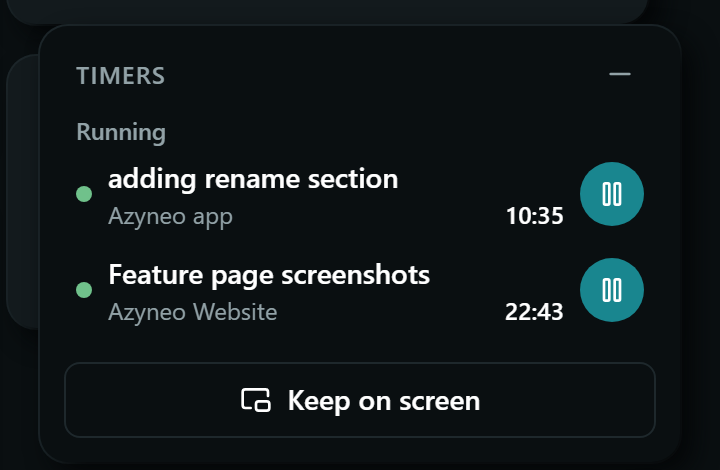
- A floating timer that stays on screen while you work, from the Timers button
- Time each subtask, even in parallel
- Edits are logged, so timesheets stay auditable
// Billable
Billable vs non-billable, per client and per person
Every hour lands somewhere: billable to a client, or internal. That single classification is what makes utilisation meaningful and what turns a timesheet into an invoice line without anyone re-typing it.
- Cost rate and bill rate set per person
- Retainer burn against the hours you actually sold
- Export to invoicing, or pull it through the reporting API
Who is over capacity next week?
Riya K is booked to 104% on Tuesday. Moving “Applications sheet” to Arjun M clears it without changing the Acme deadline.
Draft · confirm to applyEvery write is drafted first and confirmed by you
// How It Works
How to track billable hours in an agency
4 steps, one continuous record. Nothing is re-keyed between them.
Set cost and bill rates per person
Once. Everything downstream — utilisation, margin — derives from these.
Track time on the task itself
So the numbers can answer what a deliverable cost, not just a client.
Review the weekly timesheet
Corrections are expected; they are recorded rather than silently applied.
Export to invoicing
Billable hours leave as invoice-ready lines with the client and project attached.
// Utilisation
What good utilisation looks like
Industry benchmarks put healthy billable utilisation for agency delivery staff at roughly 65–80%. Below that, margin leaks into internal work; well above it, people burn out and quality drops. Azyneo reports the real figure per person and per week, so the target is measured rather than assumed.
FAQ
Time tracking questions
Adoption depends on friction. Starting a timer is one click from the task somebody is already looking at, the floating timer stays on screen while they work, and there is no separate timesheet app to remember on Friday.
Yes, at subtask level. Subtasks can be timed in parallel, which matches how work like rendering one thing while editing another actually happens.
Yes, and the edit is logged. Blocking corrections produces worse data, not better; recording them keeps the timesheet auditable.
Timers pause when the browser closes, and abandoned timers are closed automatically, so a forgotten timer does not bill overnight.
Get Azyneo running for your agency.
Tell us your team size and how you want to run it — SaaS or on-premises — and sales will come back with a quote the same working day.